
When something might be a problem, the plant is outlined in red with a small badge, and its details say what's wrong in words. Warnings are reminders, not rules: you can leave a plant where it is.
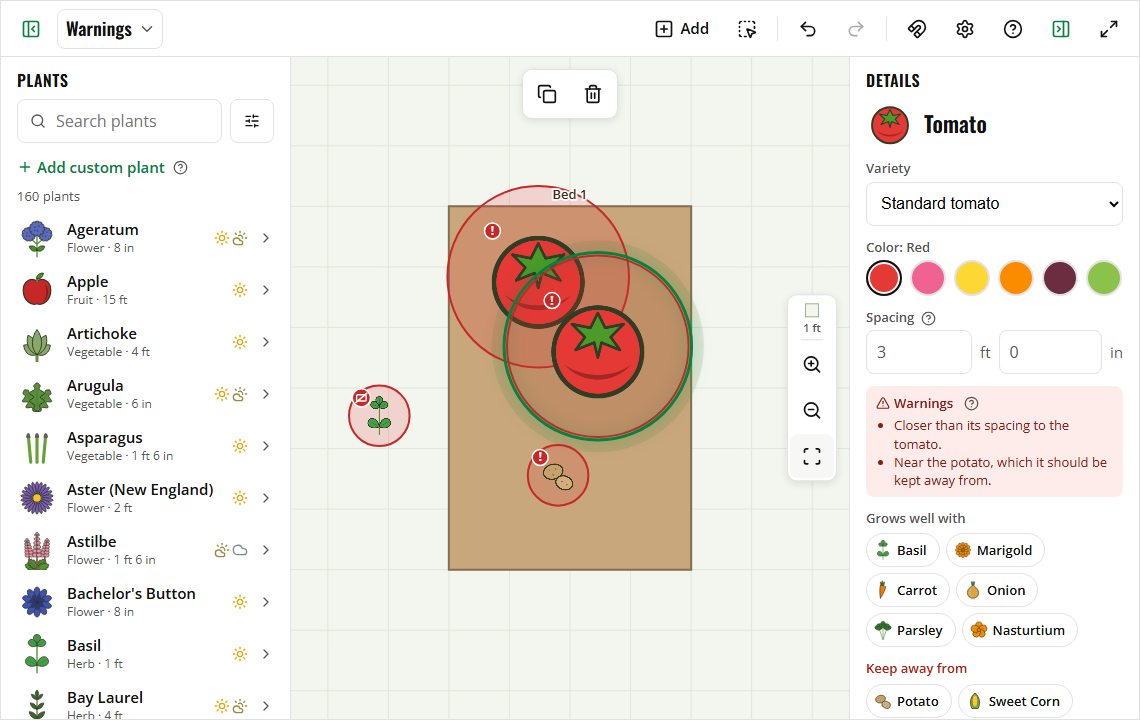
The badges
| Badge | Means |
|---|---|
| ! | Too close to another plant, near a plant it should be kept away from, or (in square-foot gardens) on top of another square |
| Crossed-out bed | Not in a bed |
Reading a warning
Select the plant (or square-foot tile). Its details have a Warnings list, for example:
- "Closer than its spacing to the tomato."
- "Near the dill, which it should be kept away from."
- "Not in a bed."
- "On an obstacle."
On a computer, hovering over a plant shows the same warnings in its card.
Too close
Each plant's light circle shows the room it needs (its recommended spacing). When two plants are closer than that, both get a warning. To fix it, drag one further away, or select it and lower its Spacing if you plant closer on purpose.
Tip: Turn on snapping To other plants (the magnet button) and a dropped plant settles just touching its neighbor, at the right spacing.
Bad neighbors
Some plants grow poorly next to each other, like tomatoes near potatoes. When two of them are close, both are warned. A plant's details list the plants it Grows well with and the ones to Keep away from, and the Grows well with filter in the plant list finds good companions.
Not in a bed
Plants can go anywhere, like a fruit tree in the yard. A plant that isn't in a bed (or is on an obstacle) gets the crossed-out bed badge. It doesn't move with any bed.
Pictures and prints
Warning outlines and badges show only in the planner. They're left out of printouts, pictures and PDFs.
