
Settings
The gear button in the toolbar opens Settings:
- Units: Feet or Meters. Every length in the planner (bed sizes, spacing, plant info) switches. Your first garden starts in meters in Canada, the UK, Australia and New Zealand.
- Plant names and zones: your country: United States, Canada, United Kingdom, Australia or New Zealand. Plants go by the names used there (courgette and aubergine in the UK, capsicum in Australia and New Zealand...), and the UK gets RHS hardiness ratings instead of USDA zones. It starts on the country your browser's language is set to.
- Appearance: Light or Dark, for the whole planner and the garden. Downloaded and shared pictures use it too; printouts and PDFs are always light.
- Show plant names: labels every plant with its name.
- Show measurements: each bed's edge lengths (outside it) and each obstacle's (inside it). Separate for beds and obstacles. They show in pictures, PDFs and prints too.
- Lock all beds and obstacles: so placing plants doesn't bump them. Long-press a locked one to see its details. See Locking.
- Show ? help icons: the small ? buttons next to some settings and details. Tap one for a short explanation and a link to the help page about it. Untick to hide them.
- Show tips: a tip pops up at the top of the garden the first time you use something, like your first bed. Each tip shows once. Show all tips again brings them back.
Settings are remembered in your browser.
Snapping
Snapping lines things up as you drop them. The magnet button in the toolbar opens Snapping. Everything starts off; turn on what you like.
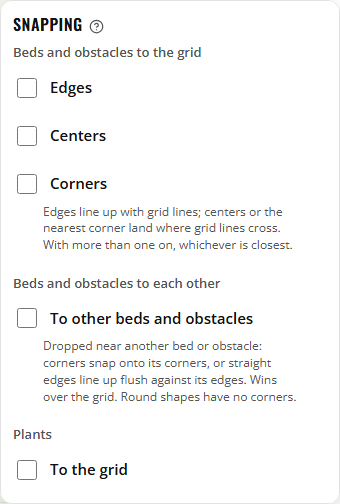
Beds and obstacles to the grid
- Edges: bed edges line up with grid lines.
- Centers: a bed's center lands where grid lines cross.
- Corners: the nearest corner lands where grid lines cross. Good for turned beds and L, U and triangle shapes.
With more than one on, whichever is closest wins.
Beds and obstacles to each other
Dropped near another bed or obstacle, a corner snaps onto its corner, or a straight edge lines up flush against its edge. Good for beds that touch, or a path running along a bed. This wins over the grid. Round shapes have no corners, so they don't snap this way.
Plants
- To the grid: plants land in the middle of a grid square (or an even split of it, for small plants).
- To other plants: a dropped plant moves so its spacing circle just touches its neighbor's. Near two plants, it touches both.
- To bed and obstacle edges: its spacing circle just touches the edge, inside a bed or outside an obstacle.
Snapping to plants and edges wins over the grid, and a plant never snaps onto a spot that overlaps another plant.
