
All of these are in the garden menu (tap the garden's name in the toolbar). They need at least one bed in the garden.
Pictures
Download image saves a picture of your garden. On a phone or tablet, Share image… sends it straight to your share menu: messages, social media, email, or your photos.
Before the picture is made, you choose what it shows:
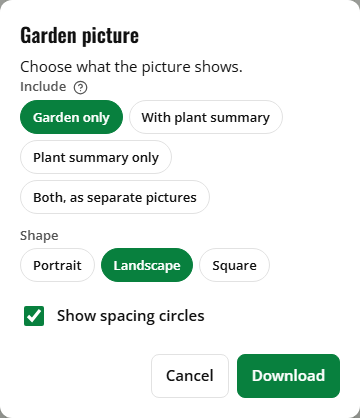
- Include: Garden only, With plant summary (the garden's name, date and a plant list with it), Plant summary only, or Both, as separate pictures.
- Shape: Portrait or Landscape (or Square for the garden on its own). With the plant summary, portrait puts the list under the garden and landscape beside it.
- Show spacing circles: on by default. Without them, the plant pictures are drawn bigger.
The picture is framed around your beds, with a scale bar and a small "friendlyplanter.com" in the corner. It uses the garden background from Settings (light or dark).
Printing
Print… prints the garden's name, the date, the grid size, a line with the number of beds, their area and the number of plants, the garden picture, and the plant list (with each plant's variety and color). Only the plan prints, not the rest of the web page.
Download PDF makes a PDF file: the garden picture on the first page, then the plant list. It's letter size when the garden is in feet, A4 in meters.
What shows in them
- Labels, plant pictures and spacing circles show, like in the planner.
- Measurements show if they're turned on in Settings.
- Warning outlines and badges, selection handles and the row spacing ovals are left out.
