
Searching and filtering
The Plants list has every vegetable, herb, flower and fruit you can place. Type in Search plants to find one by name (any of its names: aubergine finds eggplant, courgette finds zucchini), or tap Filters to narrow the list by:
- Type: vegetables, herbs, flowers, fruits
- Sun: full sun, part shade, shade
- Water: low, medium, high
- Life cycle: annual, biennial, perennial
- Season: cool season or warm season
- Size: how far apart they're planted
- Harvest: quick crops
- Hardiness zone: perennials that survive winter in your zone (plants grown as annuals always show). In the UK, RHS hardiness instead: perennials at least as hardy as the rating you pick
- Grows well with: good companions for a plant you pick
- Custom plants only
Each plant in the list shows its sun needs with a small icon.
A plant's details
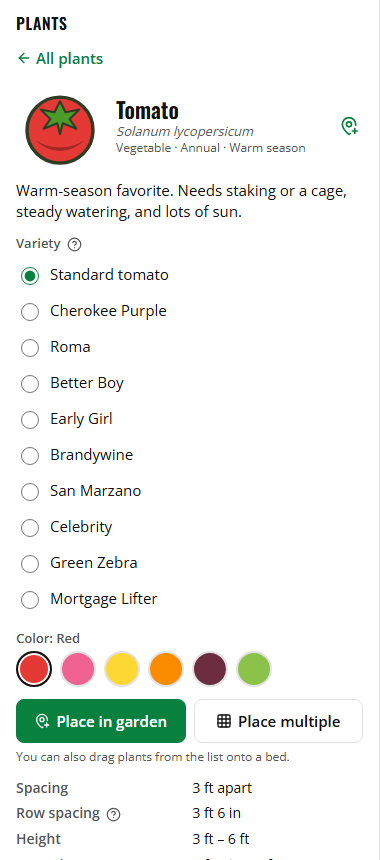
Tap a plant to see its details: its other names, spacing, row spacing, height and spread, sun, water, soil, growing zones, when to start it indoors or plant it outside, how soon it's ready, and the plants it grows well with or should be kept away from. Many plants link to an article on growing them.
Growing zones and planting times
USDA growing zones say where a plant grows. For perennials (plants that come back every year), they're the zones where it survives the winter. Plants usually grown for one season are marked "grown as an annual": the zones are where people usually grow them, and they show whatever zone you filter by.
- UK: plants show their RHS hardiness rating instead, from H1 (needs a heated greenhouse) to H7 (very hardy), worked out from their USDA zones with the RHS's own table. Plants grown as annuals don't have one.
- Canada: Canada's own zones are numbered differently. Find your USDA zone on Natural Resources Canada's USDA-style map at planthardiness.gc.ca.
- Australia and New Zealand: there's no official zone system of your own, so the planner shows USDA zones; a USDA-style zone map shows yours.
Which you see goes with Plant names and zones in Settings.
Start indoors, Plant outside and Sow outside count from your last spring frost date, for example "6–8 weeks before last frost". Look up your area's last frost date, then count back or forward from it.
Varieties and colors
Many plants have varieties, like Cherokee Purple tomatoes or Sugar Snap peas. Pick one under Variety before placing; it can change the spacing and other details. Plants that come in colors, like peppers or petunias, have a Color choice too, and their picture in the garden shows that color.
Varieties other than the standard one show a small asterisk (*) on their picture in the garden.
To change a plant that's already placed, select it and pick a different Variety or Color in its details.
Custom plants
Growing something that isn't in the list? Tap Add custom plant, under the search box.
Only a Name and Spacing are needed. In a square-foot garden there's also a Square-foot count: how many go in one square, or how many squares one plant takes. Leave it on From its spacing to have it worked out for you. You can also add its type, sun, water, notes, and the plants it grows well with or should be kept away from. For its Picture, use its initials, or another plant's picture in one of that plant's colors (for example an orange bell pepper for a "Tangerine Dream" pepper).
Custom plants show in the list with a Custom tag. Their details have Edit and Delete.
Custom plants are saved in the garden they were made in. To use them in another garden, use Export custom plants in the garden menu, then Import file… in the other garden. See Saving, files and share links.
Plant summary
With nothing selected, the Details panel shows the Plant summary: how many of each plant are in the garden, by variety and color (for example "Petunia – pink × 12"). A selected bed's details show the plants in that bed. Tap a row to open that plant's details.
